Agent Rendering: We Stopped Sending Screenshots to Our Agents

If you have built an agent that drives a browser, you have hit this wall. The page loads, and now you have to tell the model what is on it. The usual answers are a screenshot or a dump of the DOM. Both are expensive, and both ask the model to do work it should not have to do. In Owl Browser v1.2.0 we shipped a third option, and made it the way Owl talks to agents. We call it agent rendering.
The problem with screenshots and DOM dumps
A screenshot is built for a human retina. When you hand one to a model you pay to encode an image, the model runs it through a vision pass, and at the end of all that it still only knows what is on the page, not where anything is. To click something it has to estimate pixel coordinates. Guess wrong, and you get a misclick, which means another screenshot and another turn. The cost compounds with every step.
A raw HTML dump avoids the guessing but trades it for noise: thousands of tokens of markup, scripts, and wrappers, most of which the model does not need, and it still has to reconstruct the page structure itself. We wanted numbers rather than opinions, so we measured all three on the same page.
The benchmark
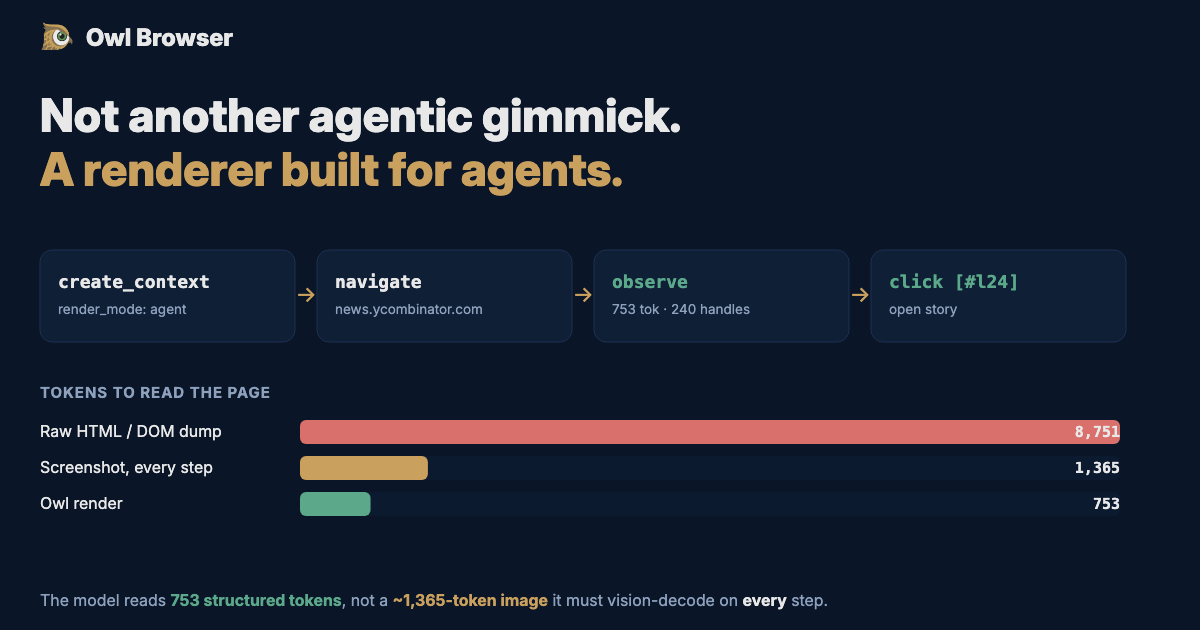
The Hacker News front page, given to a model three ways:
| How the page reaches the model | Tokens | Can the model act on it? |
|---|---|---|
| Screenshot (1280x800) | ~1,365 (Claude) / ~1,105 (GPT-4o) | Pixels only. 0 handles. Must guess coordinates. Re-sent every step. |
| Raw HTML / DOM dump | ~8,751 | Everything, including the noise. |
| Owl agent render | 753 | 240 elements, each addressable by a stable handle. Model-ready. |
The headline is not just that 753 is smaller than 1,365. It is that those 753 tokens are structured and actionable, while the 1,365 are flat pixels the model has to decode and then squint at. And an agent takes a screenshot on every step, while Owl re-reads the same page as a near-zero delta when nothing changed.
What agent rendering actually is
When you create a context with render_mode set to agent, Owl serializes the rendered page into OwlMark: a compact, hierarchical text view of what is genuinely on the screen, with a handle table of every interactive element. Each handle is a short, stable token. The agent clicks and types by handle, not by coordinate. The loop is deliberately small, because agents lose the thread when there are too many steps:
create_context(render_mode: agent)
  -> navigate(url)
  -> observe            # OwlMark view + handle table
  -> click(handle) / type(handle, text)
  -> observe            # see the result, repeat
No coordinate math. No misfires. No vision pass on every turn. The model reads the page the way it reads anything else: as structured text it can reason about. Screenshots do not go away. When an agent genuinely needs to confirm a layout, a color, or a visual style, it can still capture pixels. The point of v1.2.0 is that pixels stop being the default tax on every single action.
This part is worth being precise about: agent rendering is a renderer, not a JavaScript plugin sitting on top of a normal browser. Every browser before this was built for humans, and they are excellent at that job. Relabeling one of them for agents without changing what the agent receives does not make it agent-native. It just moves the cost onto your token bill.
Built for the smaller models too
It is easy to make something that works for the largest frontier model. The harder and more useful target is the smaller, cheaper model that loses focus when you flood its context. A short, structured, handle-addressable view is exactly what those models need to stay on task: fewer tokens to read, nothing to decode, no coordinates to guess. The same philosophy extends to how Owl exposes itself over MCP in v1.2.0, where the server defaults to a lean, agent-native toolset and the observe-and-act loop, instead of dumping a long list of tools on the model. You opt into broader toolsets by profile when you need them.
What is in v1.2.0
- A new render_mode (agent, both, or pixel) on every browser context. Default behaviour for existing users is unchanged.
- OwlMark: the compact, handle-addressable page render, returned by a single browser_observe call.
- Click and type by handle, with truthful action results, plus browser_expand and browser_read_node for drilling in.
- Screenshots kept as a first-class tool for genuine visual checks.
- An MCP server that promotes the agent-native loop and a curated, profile-based toolset.
Owl Browser is an AI-native browser automation platform from Olib AI. v1.2.0 brings agent rendering to the REST API, the SDKs, and the MCP server. If you are building agents that browse, this is the difference between paying for pixels and paying for progress.
Want to automate seamlessly?
Owl Browser bypasses all sophisticated bot detections effortlessly.